
How to Aligning Text To A Path In After Effects

One of the most interesting and eye-catching animations you can accomplish in After Effects is the text to path animation and it enables you to go beyond the included text presets from the Adobe Bridge and create something unique
Here’s how to do it
We’ll take this technique from scratch and first, we’ll create a new comp, 1920x1080px and 29.97 fps
 Layer-New – Solid and we’ll name it BG and set the color to dark blue
 Next, we’ll hit the text button and type a sample text
Then, with the pen tool selected, we’re going to draw a shape line that covers the whole width of the screen.
Next, we’ll hit the text button and type a sample text
Then, with the pen tool selected, we’re going to draw a shape line that covers the whole width of the screen.
 Next, we’ll toggle down the text options and under the path options, we’ll choose “Mask1”
The text will be automatically repositioned on the path we’ve just created and we’ll be also presented with new options in the drop-down menu for the path options.
Next, we’ll toggle down the text options and under the path options, we’ll choose “Mask1”
The text will be automatically repositioned on the path we’ve just created and we’ll be also presented with new options in the drop-down menu for the path options.
 We will set a keyframe for the first margin and drag the value to negative until the text is out of view, then move the cursor forward and create a new keyframe with a positive value, until the text goes out of sight.
 This is how to achieve a basic text animation along a path but we are going to improve it further since we also can benefit from the addition of text animators.
Taking things further
First, we’ll delete the keyframes we’ve initially added to the first margin property and from the paragraph panel, we’ll set the text to be aligned right.
We’ll set a keyframe for the last margin and drag the value to the left until the text is positioned on the left side of the screen.
Next, we’ll move the time indicator forward and set a new keyframe for the last margin and this time we’ll position the text in the middle of the screen.
We’ll duplicate the keyframe so that the text stays in view for a while, then move the time indicator forward and increase the value of the last margin property, until the text is no longer visible and goes out of view.
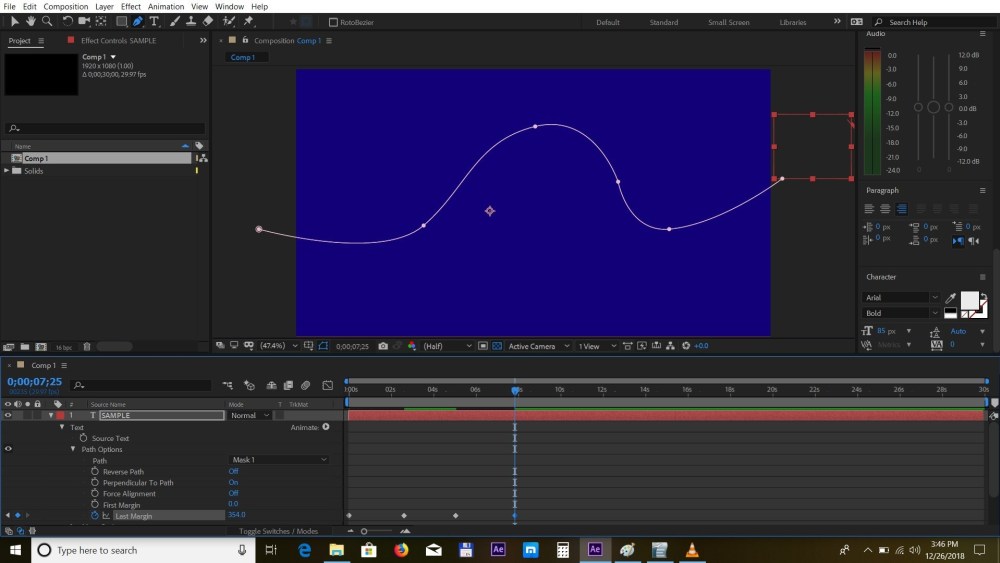 Next, we’ll choose the 2 middle keyframes and press F9 to apply the easy ease dynamic.
 Now we’ll go to the animated menu and choose “Tracking”. We’ll add two keyframes with 0 value and -16.
We’ll duplicate this keyframe just like we did before, and add the last one with the initial value of 0.
Now we’ll go to the animated menu and choose “Tracking”. We’ll add two keyframes with 0 value and -16.
We’ll duplicate this keyframe just like we did before, and add the last one with the initial value of 0.
 Next, we’ll select the first and the third keyframe and apply the easy ease by pressing F9
 Lastly, we’ll add an inertia expression to the tracking amount to give it more life, so we’ll ALT click on the stopwatch and add the expression.
You can just copy and paste it from here:
amp = .15;
freq = 2.0;
decay = 5.0;
n = 0;
time_max = 4;
if (numKeys > 0){
n = nearestKey(time).index;
if (key(n).time > time){
n–;
}}
if (n == 0){ t = 0;
}else{
t = time – key(n).time;
}
if (n > 0 && t < time_max){
v = velocityAtTime(key(n).time – thisComp.frameDuration/10);
value + v*amp*Math.sin(freq*t*2*Math.PI)/Math.exp(decay*t);
}else{value}
By now you’ll see that we have a natural moving and looking motion and you can use your creativity to expand this technique forward
Thanks for reading this article and stay tuned for more articles on AE and Premiere coming soon.
Lastly, we’ll add an inertia expression to the tracking amount to give it more life, so we’ll ALT click on the stopwatch and add the expression.
You can just copy and paste it from here:
amp = .15;
freq = 2.0;
decay = 5.0;
n = 0;
time_max = 4;
if (numKeys > 0){
n = nearestKey(time).index;
if (key(n).time > time){
n–;
}}
if (n == 0){ t = 0;
}else{
t = time – key(n).time;
}
if (n > 0 && t < time_max){
v = velocityAtTime(key(n).time – thisComp.frameDuration/10);
value + v*amp*Math.sin(freq*t*2*Math.PI)/Math.exp(decay*t);
}else{value}
By now you’ll see that we have a natural moving and looking motion and you can use your creativity to expand this technique forward
Thanks for reading this article and stay tuned for more articles on AE and Premiere coming soon.


